A lot of people really underestimate the impact that mobility and strengthening can have addressing issues with RSI. If you're struggling with RSI, consider going to physical therapy as your condition may be caused by a wide variety of issues that aren't obvious based on the pain you're having.
My own experience was that I dealt with ulnar nerve RSI for about a year. During that time I wore braces at night and tried just about every keyboard and keyboard layout imaginable, and at best I managed to keep it at bay. When I finally made up my mind to go to physical therapy I learned that:
1. I had postural issues which led to trapping the ulnar nerve in my shoulder (not my wrist, that was just where the pain referred to)
2. I had deep myofascial issues that were preventing my muscles and nerve from moving freely in my arm
3. I had poor mobility which was contributing to decreased function overall
Where I thought I had a localized problem in my wrist, it turned out I had a systemic problem which required strengthening through my entire arm, shoulder, back, neck, and core. I resolved these issues through physical therapy and my ulnar RSI hasn't returned since, though I now maintain an exercise routine that focuses on mobility. I still use an ergonomic keyboard, but I'm now convinced that the issue can't really be solved with gear.
Same, I had horrible RSI in my wrists and went to a hand therapist (just a physical therapist who specializes in hands). She made me some thermoformed wrist braces to wear at night and gave me wrist massages which felt awesome, but the main thing she did was prescribe a set of simple wrist exercises which take about 2 minutes to do. I did them every day and my RSI is much better. I still can't do certain things that require 90deg wrist bends that support a lot of weight (mostly pushups), and I'm planning to go back after covid to continue improving, but I can actually type fine for 8 hour+ stretches at a time with 0 pain afterwards.
Most of the ergonomic typing stuff I see online is 100% bunk IMO. People spend tons of money and time on ergonomic keyboards and relearning how to type on different layouts just to buy wrist rests and type with their hands tilted up 15 degrees. Eek.
I had the exact same experience/realization. It's very easy to get focused on work and stop paying attention to the irritation one is putting their body in.
I have two examples.
Recently, I noticed that my neck posture was starting to lean forward again, and I realized that it was because I was sitting just a few more centimeters away from my desk because I had changed the place that I was sitting at. Given that I hadn't changed my font size, I was naturally leaning forward just a little bit. Once I noticed that, I bought a better monitor arm, moved my monitor closer, and now I can slowly return my posture to a less craned position. I've done it before, so I'm not too worried about getting it done eventually. Standing against a wall for a few minutes to calibrate your sense of where your head should be is a good tool for this.
The other example is when I was subconsciously stopping my keyboard from slipping using my right hand when it was on a slight incline. Eventually, this caused my entire right arm to be in pain on a daily basis from not just the wrist, but the elbow, shoulder, and back.
It's little things like this that make a huge difference. You have to appreciate how sensitive a body can be when you're sitting in the same position for so many hours (switching up positions/standing can help with this).
Once I fixed those things, I still had to reverse the damage that had been done, so I took a break from work for about a week and started doing exercises at home again. Mainly just pull ups and push ups (with a form that emphasized triceps more than chest) as far as arms were concerned, and that very slowly strengthed my shoulders and back, which got me to pain free after about a month and a half.
Even simple exercises like that can be enough to help prevent/undo a lot of the pain of RSI.
I have had manageable but painful wrist pain in both wrists for about 2 years, and I worry about the long term because Im only 26 now. I had never thought of this as an avenue to explore even though Ive had good results in the past from pt for a weightlifting injury. Thanks!!
Yeah, referred pain is weird. When people have hand RSI the root cause is much more likely to be a shoulder/neck/postural thing rather than a hand thing. Its unfortunate 'carpal tunnel syndrome' has become such a widespread diagnosis when IIRC something like 1% of issues are actually due to the carpal tunnel itself.
To use a web analogy, its like having a broken button on a webpage and thinking it's a problem with the HTML (the hand) rather than with the server (the neck area).
What sort of exercises do you do to help with this? I've been finding it very hard to work on shoulder strength, especially the scapula, without just impinging it more
I actually needed a few weeks of body work and mild exercises to teach me how to correctly engage my scapula before I graduated into more rigorous exercise, and I still require work to keep my infraspinatus from feeling like a steel cable. Things that helped the most:
- Prone T's/I's
- Cat Cows with thoracic spine emphasis
- Child's pose
- Open Books
- Supine Chin Tucks
- Dead bugs/Bird dogs
- Upper trapezius stretch
- Levator scapulae stretch
- Quadruped open book
- Foam rolling back (every few days)
These all caused pain at various points, but as I learned to keep my shoulder rooted in the socket and learned how to correctly engage my scapula (pull down and back rather than up and back) I was able to do them without pain. I also learned to listen to my body and skip things for as long as needed when I wasn't feeling right. Pushing through nerve pain just leads to more pain. Your body will adjust eventually, but it will do it at its own pace.
EDIT:
1. Exercise frequency: daily/as tolerated
2. I also scrape the muscles in my inner forearms with a fascia release tool (butterknife, but you can find real ones online) a few times a week and this helps tremendously.
After going through the exact same thing (ulnar nerve RSI, pain in my wrist and hand, caused by my shoulder), my PT recommended a suspension trainer. It's cheap, doesn't take a lot of space and you can adjust your body angle to "set the weight". For example, if push ups are too hard, just reduce the angle until you can handle it. This way you can vary load from nothing up to your body weight. Pretty easy to set up too (I just bolted it onto a sturdy wall).
He recommended I exercise every day, I picked just before bedtime as a constant so it's easier to remember.
Instead of sets and repetitions he gave me the rule to just keep going with each exercise until I can't anymore (and that doesn't take much in the beginning).
Finally he gave me the advice to always choose exercises from three different categories: push, pull, and legs.
So you could get started with (1) pull ups/rows/flys, (2) standing push ups and finish with (3) squats for example. There's tons of charts online. Rows and flys are good for strengthening your shoulders.
Also, remember to take the exercises slowly and be mindful/aware of your motions and posture. Don't rush through them, put some music on, put your phone away, focus on the exercises! Quality over quantity.
I’ve had some success. If you’re getting started, resistance bands feel safer (less likely to injure something).
Any exercise transmitting force through the shoulder forces the scapula to hold (otherwise the rotator cuff would get injured instead; learn to avoid that before starting).
Pulling a resistance band is a good start; eg stand on the band and curl up, or wrap it around a doorknob and pull across the body.
Finally, if you’re well paid, get a physiotherapist or physical therapist to walk you through the exercises; the money is well worth avoiding the injury risk.
I'm also interested in knowing this. On top of that I would like to know how often they exercise and for how long. I found that doing strength training helps a bit, but the relief I get from it is only temporary. I try to do it a bit every day but I guess I could increase the amount each day.
I've absolutely noticed that my RSI / carpal tunnel flare-ups are extremely closely correlated with the closure of gyms in my local area due to pandemic restrictions. Now I'm training on bars at the park its getting a lot better.
yep, while i don't have full blown RSI/carpal-tunnel issues, the 3 decades of computer has been taking its tall on the wrists, especially the mouse one, and the pull-ups do help here as well as letting my wife practice jiu-jitsu on me, specifically those wrist handling techniques, to the extent of inducing low level pain which works as a kind of strong firm massage :)
I’ve learned a lot about RSI over the past year, having spent about 8 months completely unable to type or use a mouse, trying dozens of things and talking to dozens of people. And the main thing I’ve learned is that every story is unique; the right thing for one person might be an absolutely terrible idea for another.
Folks in the comments seem to be making pretty broad statements about what is good or bad, and I just want to let readers know to take everything with a huge grain of salt.
In my case, fear of making things worse was the biggest obstacle — pushing myself to trust that typing isn’t dangerous, even though it hurt, was critical in my recovery. This is awful advice for many people with RSI, though.
My advice: see a physical therapist first. They can often help, or point you in the right direction. If months pass and nothing seems to help, seek out alternative explanations and keep an open mind. Check out The Mindbody Prescription” by Dr Sarno. It was the missing puzzle piece for me.
I totally agree, the prevailing RSI advice about posture and exercise and fancy chairs and input devices and taking breaks is not one-size-fits-all. In my case, Sarno's book showed me how my neurotic fixation on RSI was making it worse.
I wrote this comment in 2016: https://news.ycombinator.com/item?id=12990976. My RSI continues to be totally gone (it's been gone 14+ years now, the RSI started a couple years before that), and I never even think about it anymore.
If you have RSI and you are reading this, please try to keep an open mind. Not all cases are the same, and fixating on/worrying about the RSI constantly is not necessarily the best path forward.
Yep, I'm in the same boat. Suffered for about a year, read the book, 100% cured within a month. Still no issues three years later. I have terrible posture and type all day on a laptop. I shudder to think of the alternate future in which I continued grappling with wrist pain for the rest of my career.
I wish I found your comment a year ago! I had cubital tunnel syndrome as well, and was days from spending a lot of money on the ulnar transposition surgery. It’s been ~4 months since then and it’s 95% better, and improving steadily
That's great! Like you, it did take me a while to get to 100%. Old habits die hard, I guess. You really know you're there when you realize you forgot to think about RSI for a whole week/month/whatever.
I've been typing for 36 years now (since I was a child), and have never had RSI once, or anything close to it.
I think it's because I never learned to touch-type "properly". I use most of my fingers, and I type very fast, but I'm not hitting the "correct" keys with the "correct" fingers - I'm just following whatever comfortable patterns I've burned into muscle memory over all these years.
If someone asked me to describe exactly what I do - where my hands and fingers hover, which ones hit which keys, etc., I wouldn't be able to answer properly without first filming myself.
I did once try to learn to touch-type "properly". It didn't feel comfortable and started to hurt after only doing it for a little while, so I stopped.
I've been typing on a daily basis for the past 41 years. I took a typing class 36 years ago, and have continued to type probably 90-95% 'properly' ever since. This class paid off by the way, and my accurate typing speed peaked at around 140 words per minute.
Like you, I've been blessed with never having any hint of RSI.
I'm not necessarily disagreeing with you, but I think the whole 'RSI landscape' is, as with most things, very complex, including a lot of poorly understood or currently unknown factors.
I've heard the same story from others, and it's my story too. I type fast enough and accurately enough to get ideas out of my head. I tried to type "correctly" way back in junior high (on a typewriter, no less!) but found that my personal technique (developed since first using Apple II's at 8 y/o) worked better (even on a real typewriter).
Thirty-six years typing this way and never any pain.
I know what you mean re: the muscle memory being burned in. It, no doubt, contributes to my frustration when developers change keyboard shortcuts in systems I've used for years. When Microsoft decided to change "Log off..." to "Sign out" (in Windows 10? 8? I can't recall...) I lost my go-to <CTRL>-<ESC> <ESC> <ALT>-<F4> <L> <ENTER> shortcut for logging off. Now I have to look at the screen to make sure my <S> isn't getting "Switch User", "Sign Out", "Sleep" or "Shutdown". (I guess I was the only person in the world who found the keyboard shortcuts for those choices being dis-ambiguous to be valuable...)
This is very much my experience! When I developed RSI I immediately went down the ergo-keyboard route, assuming I had been doing something wrong, when in reality it was just the change to a laptop for a long time.
It was quite weird filming myself and looking back at it. I never even noticed that I regularly hit Y with my left hand, for example!
Thank you for posting this. I don’t type “properly” either and even though I type quickly even with an unorthodox style I still feel self-conscious about it at times.
A few years ago I started having RSI issues. At a certain point I couldn't even comfortably hold a phone or glass with my right arm. There was no position I could hold my arm where I didn't feel pain.
I went to a physiotherapist / mensendieck for therapy, which kind of worked. The real 'cure' for me was a small Wacom Bamboo pen tablet and screens at eye-level. Not having to look up or down. Coding with a pen tablet is a bit weird at first, but you get used to it. And I love the fact that I can work again. I spent a few weeks at home on sick leave back then. Take precautions! Slow down if you feel something weird. You really don't want to get it.
One good practical tip I remember clearly is that your lower back may do some work to sit straight, it's the upper back / shoulders that must be able to relax completely. This is the opposite of bending over your laptop.
And as the author mentions, the body needs time to heal. My arm was literally very cold compared to my other arm, I had cramped muscles which reduced blood flow. Stretching (guided by a therapist / professional) helps a lot as well. I could feel my arm warming up after each session.
To this day I'm suffering from RSI, but it's manageable as long as I work with my pen tablet. If I sit on the couch for 30mins with my laptop, my arm starts acting up immediately.
> In my personal experience I found home-row typing to actually be unergonomic mostly because of the additional bend required from moving both hands closer together.
I've always thought this too.
I've been typing a lot since about 1996 and never got into home row typing. It never felt natural or comfortable and I don't have abnormally sized hands either. It just felt like going against the system.
I don't want to jinx myself but over the decades I've experienced no pain or issues with any joints or muscles but I've always made sure no matter what desk I used my forearms were parallel to the floor and my wrists were effortlessly resting in front of the keyboard. I think this aspect cannot be ignored, especially for long sessions.
Then for typing style I mainly move my hands around while I type with my all of my fingers except pinky fingers. Where like 80% of typing is done with thumbs, index and middle fingers. Overall I have lots of hand movement and can type without looking for just about all key presses (except some combos) at about 70-75 wpm with good accuracy.
Based on his video, my hands move probably 2x more from side to side but the overall style is kind of similar. It's also similar in the sense that my right hand moves more than my left.
The thing that always confused me about home-row typing is that it seems oddly hard to hit Enter. My only guess to that is that it works better with an ANSI keyboard than with an ISO keyboard.
I also found I type rarely with my pinkies, and in fact I do pretty much only use them for Ctrl + Shift. Using the Shift on the opposite hand from the target key most of the time took some practice but I think lends itself well to not having to over-stretch the pinkies :)
Say I put my fingers on the home row, and don't think about them, relax. When everything is settled, I lock my fingers, pick my hands up, flip them over and look at my finger tips and base knuckles, the tips are at about a 25° angle. There is no 'bunching up'.
Hitting the enter key: 2 options for me. 1) pick my whole hand up, shift it over about one key, twist my wrist a couple of degrees, and then drop my hand vertically to hit enter. 2) lift my hand very slightly, move it down and to the right from the elbow, as if I'm trying to strike the enter key with the knife-edge of my hand, except that the pinky is extended. So my pinky hits the enter key at a 40° angle and slides across it until the click registers.
The enter key often comes between thoughts. I doubt I even notice the extra 20 ms it probably takes to hit enter and the next key.
I had a friend who typed with just the three fingers on the right hand while the left hand hovered all of the most essential letters with all five fingers. it seemed to work pretty well to just have one hand hunting around the keyboard. That said, it might making correct shift-usage correct which can negatively affect the other hand.
That being said, I have my laptop on my lap right now and if I have one hand on home row, and the other hand just kind of idly floating over the right side of the keyboard, when you go to place the fingers on home row, you can really feel in the wrist and forearm the muscles pulling the hand "outward," in relation to the rest of the arm. This, incidentally, is where a lot of my RSI-type pain has come from.
The elbows going out, fore arms craning inwards, and then the wrist pulling to straighten the hands back out is a recipe for pain.
Do things that reduce stress, and get a vertical mouse! That helped me. Working out, sitting properly also helps.
My biggest issue was and still is stress, which causes muscles to tighten all over, and it can affect different parts, from the finger to the shoulder and neck. Randomly.
A physical therapist ended up being able to explain what was happening. Doctors only told me to not type for a week or two, which at least helps to not make it worse.
Same experience with IBS. No help from doctors (I don't blame them). In the end it went away after puking my guts out from a norovirus. Contents was black as the void. After 4 years of hell it was over in a week.
Very interesting. I wonder if it was the vomiting that did it, or the norovirus somehow resetting your gut bacteria? I have chronic stomach issues as well, and sometimes I get the feeling that a "total system purge" is all that's really necessary... that is, "turn it off and on again." :)
Hard to say, everyone experiences IBS differently, so there are probably many variations out there. But you could definitely try to empty the contents completely and see what happens. Norovirus was no joke though - I got mild dehydration from it, which ages you. Be careful!
In my early 20's I started working at an office job. About 6 months into the job I started getting this terrible pain in my shoulder.
Being in my 20's, it was surprising to get this kind of pain for no reason so I started to try and figure out why this was happening.
I found the answer this way:
- I realized that when I was typing, I was leaning heavily on my elbow
- Leaning on my elbow meant that my shoulder was being stressed as it was carrying a lot of my seated weight
- But why was I leaning? I figured maybe my desk wasn't level and I was compensating by leaning on my elbow
- I brought in a level and measuring tape and realized one side of my desk was 1.5" higher than the other.
The building I worked in was over 200 years old and I realized with some more measuring and level checking that the whole floor was "wavy". In fact, if I spun in an office chair instead of feeling like I was rotating around the axle, my head transcribed a circle due to the floor being slanted.
Moral of the story: it made me a believer that very small things (desk out of level, mouse pad a little too far, keyboard too close etc) can have surprisingly large effects physiologically.
By far the best ergonomics advice I got was: do what feels natural to you. For me that’s a trackball, and home row typing with my lower arms resting on the table. I have had episodes where I was dangerously close to RSI, but after that last piece of advice those troubles were over. For a while, I stockpiled Trackman marble trackballs, but the MX ergo is finally a good successor. Split keyboards did not make that much difference. And watch out with weak laptop keyboards: if the keys go too easy, you increase muscle tension to avoid typos.
I had a brief but serious bout of RSI in my right wrist in my early 30s. Ergo keyboards and novel typing layouts didn’t help at all, nor did a wrist brace. What eventually relieved it was a trackball (which the author of this article also used) and a wrist pad for that hand. I avoided normal mouses, trackpads, and the IBM/Lenovo “mouse nipple,” going so far as to bring my trackball with my laptop.
I’ve switched back long since, for precision, but the RSI never returned. Definitely check out trackballs if keyboard mitigations aren’t helping.
Which trackball did you use? I have tried almost every different kind of ergonomic keyboard / mouse alleviate my pain, but I haven't tried trackballs yet.
I have a Logitech MX Ergo which I quite like, which is a thumb trackball. I'm not sure how that compares to finger-trackballs though as I've never owned one, but a few friends have things like the Kensington one and like it a lot.
Alright, thanks. I've looked at that mouse before but I'm afraid that the ball will wear out my thumb even more. Maybe it's worth a shot though, or maybe I should go for one of those Kensington trackballs that you use your whole hand with.
Yeah it’s a shame they’re all quite expensive really and thus quite hard to try a few different ones longer term. A vertical mouse might also be worth investigating perhaps?
One thing I like about the MX Ergo is that it’s very easy to use reclined with it on your chest, which sounds odd but can be good when you’re just clicking about.
The Logitech M570 and new M575 are a cheaper way to try out a thumb trackball. I've been using an M570 for a couple years, quite happy with it, except that I've found it needs to be put on a 20-30 degree wedge to reduce wrist strain (the Ergo MX has this built in).
Like other folks have said in this thread, there is no one size fits all solution to RSI and I would encourage anyone to seek out physical therapy first (or even just start doing strength training, like dead lifts).
As someone with a crazy ergo split keyboard though, I also share the author's intuition: floating the palms and hands allows for straight wrists, and bent wrists are probably the biggest culprit of typing related RSI. Floating the hands like playing the piano makes "proper" typing difficult though, because it incorporates significant arm movement.
So my conclusion after going down the rabbit hole on ergo keyboards is that... they probably don't matter too much (it's not like we have any data anyway). It seems likely most people can accommodate standard hardware in an ergonomic way by using a non-standard typing style: arms coming in at angle with straight and non-deviated wrists, hovering hands but without wrist flexion, and avoiding finger excessive finger extension using supplemental movement from arms. This would be compared to using non-standard hardware like a Kinesis Advantage or Dactyl-Manuform with standard or "proper finger movement only" typing style.
But to the defense of ergo keyboards, I think the above are not mutually exclusive. A sane physical layout reduces the amount of arm coordination required and a split design seems to have really helped improve the mobility in my shoulders, neck, and back along with general posture.
The thing that helped the most and continued helping was not using regular computer mice. Instead I use thinkpad keyboards with a little red button for a mouse that's on the keyboard itself. This has essentialy got rid of RSI for me. Your mileage may vary, but the keyboard is like $40 so not an expensive experiment. As a matter of fact vi use 2 of those keyboards as they are pretty small and i have wide shoulders, also with 2 keyboards you can use the mouse with both hands, which also helps.
I never learned touch typing. I am a free floater myself. Rather trying to split the load evenly between my hands. Touch typing position puts a strain on my wrist.
Incidentally I also own a Topre board. I also have my trackball to the left and I have to reach out less to move the pointer. To the right I would have to cover additional distance and the arrow keys and num pad... I felt that in my shoulder, hence the change to the left.
I also don't hate myself if I make a break or typying more slowly occasionally.
I'm using this[1] and I love it. Adding 1 column of spacing between two hands is real game changer. I've tried Colemak and Workman before but I found qwerty-wide to be more comfortable than both of them. It's also much easier to learn, especially if you're Vim user.
That’s an interesting solution! As someone who likes a wider keyboard stance this makes a lot of sense to me, and I think it’d work well with an ISO layout too.
I wish Microsoft would just put out a second version of the Sculpt keyboard. Nothing else on the market really appeals in the same way, and their surface keyboard is ridic expensive.
10 keyless, wireless, negative tilt, with chicklet keys and the same key layout. Maybe less loud keys with less action would be fine.
My stupid mechanical keyboard is in the closet, along with my Apple Bluetooth keyboard. At a desktop, the sculpt is the only thing I'll use.
For me it was the arrow keys that drove me nuts and made me return my sculpt keyboard. I realized that without having some space around them, I needed to look down every time I wanted to find them.
My physical therapist's best guess is that I have pinched radial nerves in both arms. Things that have helped the most:
1. Stretches and nerve glides every couple hours.
2. Ergo keyboard[0], focused on separation so my arms are more squared with my body, and on keys that are easy to press (no more mechanical keyboard for me).
3. Foot pedals for CTRL/SHIFT/ALT. I hacked together[1] a custom solution with an arduinio and a couple industrial pedals.
My advice is start working with a PT as soon as you notice any pain or numbness in your arms or hands. I'm to a sustainable point now but I should have taken action months before I did. Maybe I could have beat it completely. Still hoping I will at some point. You're probably going to need to take some serious rest. It can be hard with deadlines or other work pressures, but try to think long term.
I guess everyone is different. For me, laptops especially the MacBook help. The mouse was the problem for me, and when I started getting RSI over 20 years ago, I discovered that when I used a pen-type mouse, everything cleared away. It was because I was using the mouse at the side of the keyboard and that was causing my wrist to twist, which ended up aggravating the nerve in the wrist that ran up and down my arm.
I ended up typing on an ergonomic keyboard, with my mouse in the middle. Whenever I need my mouse, I would push away my keyboard and use the mouse where the mouse is right in the center with my hand slightly askew at a similar angle to where I write with a pencil. This prevented the nerve from being twisted, and my RSI has largely gone away since then.
The MacBook keyboard with the mousepad also in the middle seems to work well for me as well. The main thing is ensuring I don't twist my hand away away from my body that causes the nerve to get compressed.
I recently bought a Microsoft ergonomic keyboard. It’s a split design but still one piece. It took me about a week to get used to. As a touch typist I had one key that Microsoft stuck on the left, that I type with the right, B, which is dead center on the bottom row on a usual keyboard. I don’t know which hand it canonically belongs to but it didn’t take me long to switch.
I purchased this more proactively and it’s probably unnecessary. I did get RSI symptoms while working preCOVID. When I switched to work from home, I used my Microsoft media keyboard and Logitech mxMaster mouse. The RSI went away. We briefly returned to the office and within a week I was getting pain in my right hand again. The office mouse was a cheap flatter Logitech mouse with no tilt or thumb test. I believe that mousing about was the actual cause of my RSI and that the improved grip of the mxMaster was enough to fix it. Like OP sometimes it can just be small changes.
The advice about seeking out a physical therapist is great. Here's a quick thing you can try in your own, Google scalene trigger point release. That takes a minute per side and eases the pain for a few hours. I've shown this trick to quite a few with most experiencing the same benefits.
We've gone places in that time. There's Talon (my full time project), Dragonfly/Caster, and Serenade at least. Voicecode also came and went.
My goal with Talon is to give people at all ability/pain levels a high quality free keyboard/mouse alternative - you can use it preventatively, or if you start to feel discomfort, or if you can't type at all.
This is not excellent advice regarding the keyboard used. Instead:
- learn about the risk factors: https://kinesis-ergo.com/solutions/keyboard-risk-factors/ Keep in mind that there are hundreds of tendons in our hands, so the pattern of inflammation is very personal. Anecdotes are not your friend.
- use split keyboards (or any ergo keyboard with enough space between hands) with inclination to limit pronation
While I agree with your points I'll add that Dvorak is far from the ultimate layout. For instance just try to type 'ls', which as a command-line user you'll do a lot.
People are different and will prefer different layouts. Colemak DH is a very popular and very good one, if you dislike using your pinkies the BEAKL style layouts are very good and if you have a split keyboard you might want E on one of the thumbs so RSTHD might be good. There are many, many more and you can also tweak them or create a completely new one.
I strongly disagree that Dvorak is "far from the ultimate layout". Compared to Qwerty, the differences between most of these ergonomic layouts is minor, so there's no reason to discourage someone from using Dvorak.
My immediate minor criticism of Colemak-DH is typing "the", or specifically "he".
It's a "backwards roll" of the fingers: typing ASDF on Qwerty is easier than typing FDSA, but "HE" on Colemak-DH is a common digraph in the wrong direction.
(On Dvorak, "THE" is equivalent to typing "KJD" on Qwerty, i.e. the "TH"/"KJ" is in the correct direction.)
Yes, compared to Qwerty Dvorak is much better and the difference between "the good" layouts is often minor.
I wasn't trying to discourage anyone from trying out Dvorak, or that Colemak is necessarily better, but to say that there are many alternatives and some might be a better fit for your own particular preferences.
Your argument about Dvorak is far from the ultimate layout because of "ls" utility is strange. I think it is really best layout and in regular typing "ls" is rare. If "ls" case bothers you, you can just add an alias.
What you can not get in any other layout is alteration of right and left hands, that is what makes Dvorak ultimate.
"ls" was just an example. L being a common letter in an awkward position is another, imbalance between the hands a third and other layouts get a lower score on same finger usage (pressing two keys with the same finger right after each other). See this writeup for a bunch of ways you can analyze a layout: https://sites.google.com/alanreiser.com/handsdown#h.u8i88ask...
There are many layouts that give you right/left alternation. The BEAKL layouts for example.
Interesting layout, but my opinion is that pinky keypresses is not so hard as a Beacl's effort grid says. Especially I disagree with placing rare letters on a home row in pinky positions, it is just wrong. I really want to explore the metriks which make Dvorak worse than Workman or Colemak, my experience with those three layouts tells me that something is wrong with those data on the link you have published.
For me typing on a keyboard is like a piano playing, if your pinkies move hardly, then you will have hard time playing literally any chord and it is not a piano's problem. But who knows, maybe people with hard moving pinkies want to have their own layout and Beacle is comfortable for them.
Oh I agree with your comments about the pinky. I tried BEAKL-15 for a while but I switched to a modified RSTHD to get more pinky usage (I also use a 5-column layout so I don't press shift or similar with the pinkies either.)
RSTHD is another good layout that has this left/right alternation, especially if you move E to the vowel side which I've done. But it does require a keyboard with at least two thumb keys as it has Space on one and E on the other.
The article does address both split keyboards and ortho-linear layouts. I disagree with both, personally.
Interestingly the Kinesis article you link supports the arguments I make in the article, but their solution is obviously a split keyboard because that's what they sell, rather than offering an alternative typing style. My typing style avoids all the risks they identify.
> My typing style avoids all the risks they identify.
From the article: "This is the Way"
Also: "The hands should move freely over the keyboard"
These are good examples of why we should not listen to advice based on a single example of RSI and contradicts the conclusion "no universal solution for everybody"
A lot of people experience contraction and sometimes pains in the shoulders, trapezium, arms due to moving the hands over the keyboard instead of not doing so.
Ah perhaps it’s not clear enough that those 3 items are my own ideals and I wouldn’t claim them to be correct for everybody. The article exists precisely because I was seeing comments arguing entirely to the contrary, such as “movement is bad”, which I know to be wrong for me.
There is a lot of cognitive bias towards the one way of solving RSI (buy an ergonomic keyboard) which then frustrates those for whom it doesn’t work. I’m hoping to offer a different experience which worked for me.
Typing on ortholinear is quite uncomfortable for me. I find column staggered to be far better. Also why would someone learning a new layout pick Dvorak when there are better alternatives like Colemak, Workman, or Colemak mod-DH? Theres softer mechanical keys too like silenced linears.
If you really find this to be a limiting factor for whatever reason, you can get a programmable keyboard and have it perform the translation between your desired layout and QWERTY or the default layout on your systems.
This seems like a good thread to ask - are there any split keyboards that have the "shared" keys (5/t/g/b and 6/y/h/n) on both sides? I have never found home-row typing comfortable and often move my hands around while typing, which means the hand I use to hit a letter can change from word to word. I wouldn't recommend this to anyone else, but it works for me and it's made enjoying split keyboards difficult.
If you place your hands on a normal keyboard and move your right hand three keys to the right does that feel split enough for you? If so, you might like one of those big 5x15 orthos:
I have suffered from fairly bad RSI/tendonitis issues since my early 20s. Now a days I have a split keyboard and use wasd keys for my mouse, which is slower, but causes less pain. I would not wish this kind of pain on anyone. It has greatly negatively impacted my life. Hopefully future treatments will give some help, the current treatments are very lackluster.
That makes two of us. For the last year I have considered abandoning my job as a developer. 8 hours in front of the computer 5 days a week really wears you down. I do find temporary relief after having exercised. But the pain quickly returns if I start working again, even if I have a standing desk, ergonomic keyboard, touchpad and mouse.
Yes I spent a considerable amount of money to upgrade my workstation to be more ergonomic. But I still have a lot of things left to try. It kind of hurts to spend $400+ for a single keyboard though, haha.
I have even thought about buying a Mac just to be able to use the built-in Voice Control feature. But they are really expensive, and the new Mac Mini didn't have enough ports for my monitors.
Thanks for the tip. I've come across Talon before, but never tried it. I can't use it at work because it would drive my co-workers insane, but maybe I could learn it for use at home. Can the commands be easily switched to non-english words? Also does it work with any language? I mainly use JS, HTML, CSS, Rust and C#.
One of the reasons why I was thinking of buying a Mac to use Voice Control is because it also enables dictation, which helps a lot when chatting and writing emails. It also supports my native language.
The main speech engine is English. Due to the large amount of open data available for English model training, even if you have a strong accent, you'll probably get better command accuracy by tweaking Englishy commands rather than trying to use a lower accuracy engine for your native language. (By Englishy I do mean you can say a non-existent or non-English word, ask the engine what it heard, and map that semi-phonetic result to a command.)
It's extremely customizable, there's plumbing in the open source config repo for programming language specific commands and adding support for new text editors and such. There is a dictation mode. The current public English engine isn't the best for dictation yet, but it supports switching engine between command/dictation mode.
There's an online WebSpeech dictation-only engine in the beta which has extremely good dictation accuracy for most languages, as well as vosk in the beta for offline dictation (vosk has e.g. a decent German model).
The Stenomask is one option for using voice control in an office environment where you don't want to make noise.
Yup, I have had tendonitis in my forearms since I was 19, hurts pretty much all the time. Still not sure if i'm ever going to get rid of it or if I need to just keep dealing with it.
I had some problems with RSI over the last decade too. I changed a few things and since then I never had it again. For me it always seems to come from excessive mouse usage. I never get it from keyboard typing.
Additionally I sometimes got "numb" legs which I could also completely get rid of. My personal tips for developer ergonomics are:
RSI:
- Try to use the mouse less. I e.g. changed to vim and set up many shortcuts for gnome. I can use my whole system basically without mouse if I want to. The change and setup work was really worth it for me. I also realized that vim is not about speed (which did never convince me before) but about ergonomics.
- If you get a strange feeling in your wrist, take a break. Instantly. Rest your arms. Take a walk. Have a hot bath. Relax!
- Generally take breaks from the PC. It is also good for your eyes.
- Sit correctly. Straight torso. Head a little tilted downwards. Relaxed shoulders.
- Use a good chair. It took years for me to find a chair that fit to my body.. but now it is awesome. I never had numb legs again afterwards.
- Stand up from time to time. Get a height-adjustable desk and use it. Just for 30-60 minutes. Then site back down again.
Bonus tips for eye strain.
From about 37 years of age onward I got eye strain by sitting at the computer for a longer period of time. Before that I could look at every screen forever and it didn't bother me. I also changed a few things here which made it better:
- Reduce screen brightness by a lot. Most people use too bright screens by default. I have my screens now at 45% and it's great. You have to just tune it down until it's too much then go back a bit. After some time you may get used to it and can reduce a bit more.
- Take breaks. Look into the distance.
- Use light color schemes at day and dark ones at night. This is a biggy for me. Earlier in my life I always used dark color schemes. Now I HAVE to use light schemes during daylight.. it's just so much easier on my eyes.
- Use a night mode in your system which uses warmer colors (more red) when it gets darker.
I developed some RSI in my right followed by both wrists/fingers last fall due to overuse and poor body/hand/arm posture. Thankfully it relieved with lots of rest, but heed your body's warnings lest it become permanent!
I took 4 days off in the middle of reaching a deadline just to correct my ergo setup, and the rest combined with learning really helped.
1. Take breaks! I know it sucks, I was on a deadline. But you'll be cursed with 0 deadlines later (out of work) if you push it too far.
2. A vertical mouse is better than a standard mouse because it moves the pressure from your sensitive, soft tissue under your wrist to the side. But your arm/wrist isn't immune there either. This prevents strain in my wrist now, but during an intense period, it doesn't help. Assuming you get the right trackball, trackball > vertical mouse > standard 'flat' mouse.
3. The best sources I've found are a little outdated in terms of webpage but in the end helped me immensely! The Cornell Human Ergo lab [0] is a big site with lots of useful information, namely a quick snapshot of roughly idealized setup with points like negative keyboard tilt [1], and a checklist for yourself [2].
4. A trackpad is in some ways better for your arm position than a mouse, because it's closer to your body's midline. Of course, a track pad can be worse on your fingers/hand.
5. Your ergo setup and body is a system. Even if you make one objectively positive change, this may result in undue pressure on another part of your body. Watch your aches and pains and adjust each accordingly. This usually takes iteration, or changes throughout the day (i.e. time split standing vs. sitting; time split using mouse, trackball, pen tablet).
Edit: #6 it goes without saying but is worth emphasizing: get regular exercise, sleep, and eat a balanced diet. These 3 go a long way. IME even brief brisk walks during breaks were better than simple breaks away from the keyboard.
I had RSI and switched to a kinesics advantage. My RSI somewhat went away but not completely.
Eventually I figured out I had cubital tunnel syndrome from sleeping with my arms above my head. A few weeks with a new pillow and sling and I was back to 100%.
Typing pain may be a prominent feature of RSI, but very commonly it is not the root cause.
Years ago, I was getting horrible pain in my right wrist and forearm and after process of elimination I discovered it was from moving back and forth between the keyboard and mouse. Switched to a keyboard-only workflow (vim+i3+vimium) and the pain went away completely.
I solved mine with pushups and light curls, just any physical strengthening task should help. It got so bad one time that I had to stop working at times, just exercising a few days a week and I don't even notice it at times.
Er, I am touchtyping, unless we have very different understandings of the term. I look at the screen when typing, or can type whilst holding a conversation with somebody. I can even look at the screen whilst holding a camera under my chin in order to film it ;)
As a touchtypist, I can not understand how can you touchtype while not holding your index fingers on FJ keys with sensible relief. I feel very uncomfortable if neither left nor right index finger touches those keys. And instead of having rest on the buttons, your fingers are flying, which is ridiculous from my point of view and requires an unusual level of stamina. Sorry if I am wrong, just the animation is very different from my experience.
Haha no worries, it's actually a good question as to how it works, as I'm not entirely sure myself. I think the closest equivalent is genuinely musical instruments: I also never look at the keyboard of my accordions. I imagine a part of it is having a constant reference point aside from the fingers, such as having the keyboard in a specific place, or perhaps I'm anchoring more around the modifier keys than the letters.
When I get a chance I'd quite like to film it from a few angles simultaneously to see if there's anything that can be easily identified.
I really like this explanation! I'm also able to touch-type and I'm not a home-row typist.
I noticed that my point of reference mainly the keyboard rims; once I locate the keyboard by feeling the rims with my (pinky) finger, I can just start typing. I'm using Apple Magic Keyboard for almost a decade now, it's pretty small so I'm not sure if I could do the same with standard form factor mechanical keyboard.
I sometimes use the FJ keys as point of reference too, but I don't strictly type like how a homerow typist would.
I (25yo), also had pain in my right pinky and wrist, starting about 2 years ago.
I spoke with a friend who had surgery for Carpel Tunnel Syndrome, and knew a lot more about this than me. What he told me:
* Carpel Tunnel Syndrome affects the thumb/index-finger; pain in the pinky side of your hand could be caused by the ulnar tunnel or the cubital tunnel.
- I got a foot pedal, and put Alt, Ctrl, Shift, and Enter on it (and for a while pulled those keycaps off the right side of my keyboard, to force myself to learn to use the foot pedal). This allowed me to keep using a computer while I recovered, and allowed me to avoid stressing my pinky after I recovered. I wrote a bit about that on Reddit https://reddit.com/r/emacs/comments/7remed/has_anybody_used_... .
- The tendon gliding exercises were very helpful. The other stretches didn't seem to make much difference. While I was recovering, I tried to do them hourly. I now only do them if it's acting up.
- I second his endorsement of those wrist braces. When using them, I wear them at night, and when typing if I can (I can use a desk keyboard with them, but can't use my laptop with them). While I was recovering, I used them all the time, now I only use them if it's acting up.
- More recently, I got a Keyboardio Model 01, which puts the modifiers on the thumbs, not the pinkies. The foot pedal is entirely unnecessary with it; it puts much less strain on my hands.
Nowadays, my wrist acts up maybe once a month or two.
I suspect that most of the value I got from them was wearing them while sleeping, in that they protect the blood flow to my wrists from being cut off by me lying on my arms.
> The wrists themselves should not be under strain or pressure, including wrist-rests
> The hands should move freely over the keyboard
> The idea of "less movement" is incorrect, and instead I should aim for "less stretching"
I've said these exact three things for nearly a decade. I wish there was an authoratiative source that clearly stated these for more people to understand and share.
It can be sad to see people apply various workarounds that fail to see these. Contorting your fingers or pinching your nerves aren't "preferences" - put it bluntly they come from ignorance.
I'd encourage anyone suffering RSI to create video footage of their hands over a work day. Do they look in a healthy, natural, relaxed position? Something that could be sustained for the rest of your life? If not please consider alternatives.


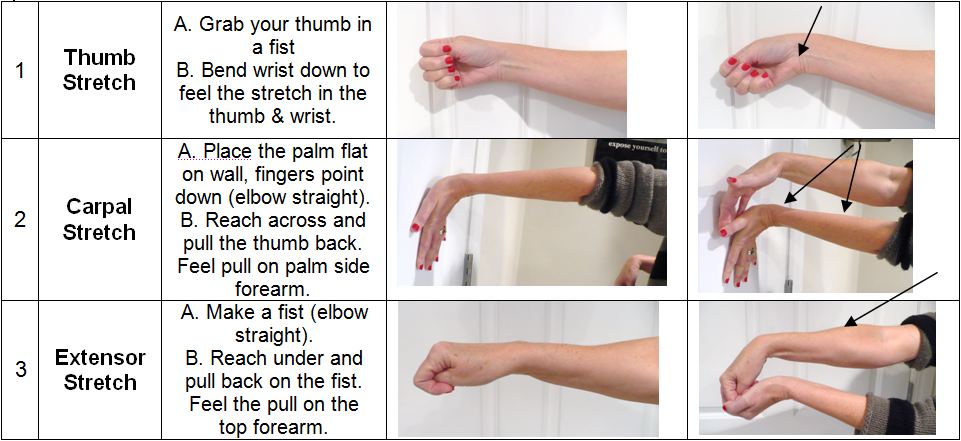

My own experience was that I dealt with ulnar nerve RSI for about a year. During that time I wore braces at night and tried just about every keyboard and keyboard layout imaginable, and at best I managed to keep it at bay. When I finally made up my mind to go to physical therapy I learned that:
1. I had postural issues which led to trapping the ulnar nerve in my shoulder (not my wrist, that was just where the pain referred to)
2. I had deep myofascial issues that were preventing my muscles and nerve from moving freely in my arm
3. I had poor mobility which was contributing to decreased function overall
Where I thought I had a localized problem in my wrist, it turned out I had a systemic problem which required strengthening through my entire arm, shoulder, back, neck, and core. I resolved these issues through physical therapy and my ulnar RSI hasn't returned since, though I now maintain an exercise routine that focuses on mobility. I still use an ergonomic keyboard, but I'm now convinced that the issue can't really be solved with gear.